Release Notes
Not every meeting should be shared with everyone. We shipped new controls for sensitive meetings and recording consent. We also have two betas to share: an upgraded Grain MCP and Grain for iPhone.
Meeting sensitivity
Grain can now flag a meeting as sensitive based on rules you set. From there, you can have Grain skip auto-sharing for any meeting flagged as sensitive.
Workspace libraries are back
Your library now has two tabs, so it's easier to find your own meetings and your team's:
- My meetings: meetings you were in or that were shared with you directly
- Team meetings: every meeting shared with your teams or your whole workspace
Recording consent
Grain can now ask attendees for consent before it records. Attendees get an email 24 hours before the meeting and can approve or decline. If anyone declines, Grain won't auto-record that meeting, and you'll get an email each time someone responds. Admins can turn this feature on in Workspace Settings > General and choose which meetings and attendees get the request. Available on Business and Enterprise plans. Learn more
API improvements
We've made big improvements to our API and its documentation. A few highlights:
- Much more reliable uploads for audio, video, or transcripts only
- Metadata you can edit through the API
- Access and sharing controls at upload
- Much easier querying
Check out the new API documentation.
8-hour meeting limit
Meetings on Business workspaces can now run up to 8 hours, up from 4. The limit is still 4 hours on Starter and 45 minutes on Free.
MCP memory (beta)
We're rearchitecting our MCP around memories. That means better, faster results that use fewer tokens.
Grain for iPhone (beta)
We're building a mobile app so you can record in-person meetings and phone conversations from your phone. It's in beta on iOS now.
That's it for now. A lot more to announce soon!
When AI knows who said what in a meeting, it’s smarter. Grain can now tell who’s speaking when capturing multiple speakers on the same mic or another mic from an unknown source.
Voice Signatures
Grain recognizes speakers by voice, so transcripts label who said what more reliably across your meetings, including local captures and in-person meetings. Better speaker labels mean your AI has cleaner context to work with using Grain’s MCP or if you copy/paste a transcript into AI.
Workspace and account settings
We separated workspace settings from account settings so it's clearer what you're changing and who it affects. Look for the split next time you open Settings in Grain.
Better transcription accuracy
We upgraded our transcription model, so transcripts come out more accurate across the board.
Cleaner shared meeting links
We cleaned up what happens when someone opens a shared meeting link: a clear no-access screen for people without permission, and a simple "Open in Grain" dialog for everyone else.
Tracker improvements
We made it so trackers throw fewer false positives and are generally more accurate.
A few other fixes
- Speaker blocks on recordings can be reset again
- The share modal no longer freezes the meeting page, and its footer now works on small screens
That's it for now. A lot more coming soon!
If you have feedback, please join our Slack community and leave your feedback in the #customer-feedback channel. We’re always trying to improve Grain based on what we hear from customers.
Your meetings hold most of your company's context: the decisions, the rationale, the customer insight. Getting that context to your AI has been more work than it should be. This release makes Grain a better meeting layer for your AI, and sharpens the notes underneath it.
Grain is now a plugin in ChatGPT
Bring any meeting, or a whole project, into ChatGPT to draft follow-ups, summarize calls, and spot patterns across conversations, without copying and pasting transcripts. Look for Grain in the ChatGPT plugin directory to connect it.
More you can do from your AI assistant (MCP)
We added two ways to get more out of Grain through the assistant you already use.
- Smart Topics tool: your assistant can now tap the topics Grain tracks across your meetings. Ask something like "pull everything customers said about pricing this quarter" instead of digging through calls one by one.
- Use AI to manage your Grain workspace: invite people, set capture and sharing defaults for teams and users, and more.
Timestamps are back in notes and action items
You asked for them, so we brought timestamps back to replace citations. Every note and action item now links to the exact moment in the recording it came from. Click any line and the player jumps straight there.
Live speaker names on Google Meet
During a Google Meet bot capture, the live transcript now shows real speaker names as the meeting happens, instead of the generic "Speaker 1" labels that only resolved after the call. You can follow who's saying what in real time.
Better language detection and transcription
A few improvements for non-English meetings:
- Language detection is now always on
- We fixed accuracy issues like German meetings being transcribed in English
- The default meeting language setting is now available on Free
That's it for now. More coming soon.
A few updates to make capturing and working with your meetings smoother. Here's what's new:
🔔 Meeting detection notifications
The desktop app now notices when you've joined a meeting and prompts you to record it in one click—even with auto-capture turned off. Watch demo here.
- Works for unscheduled and ad-hoc meetings, not just ones on your calendar
- Works with bot recording and desktop capture
- Easy access to notification settings, if you'd like to change this
- Paste a meeting link to start recording right away
- A clearer banner shows you when the Grain bot is joining
▶️ A cleaner playlist experience
We refreshed playlists to make them easier to work with:
- A cleaner, simpler layout
- Add meetings to a playlist from right inside the playlist
- Editable playlist titles
- Share a playlist the same way you share a meeting
🔄 More control over your HubSpot sync
For teams syncing meetings to HubSpot:
- Exclusion list. Keep specific meetings or domains (like internal calls) from ever reaching HubSpot.
- Admin-only connect. Only workspace admins can connect and manage the HubSpot integration.
👩🍳 A few smaller improvements
- Auto-record unscheduled meetings with the bot. A new setting to automatically capture ad-hoc meetings with the bot. Before you could only do this with desktop capture.
- Keyboard shortcuts. New shortcuts across your library so you can move faster. See here for a short demo.
- A faster library. The recording library loads quicker and lighter.
- More from your AI tools. Following last month's AI update, asking AI about your meetings now searches your entire library (no more capped results), and you can look up companies in bulk.
That's it for now. More coming soon!
We've been hearing the same thing from a lot of you: getting your meeting data into your AI tools is more friction than it should be. So we shipped a handful of things to fix that.
One-click to open any meeting in Claude or ChatGPT
From any meeting page, send your meeting directly to Claude, ChatGPT, or any AI tool in a single click. Look for the button in the top-right corner.
Richer transcripts for AI agents
Transcripts are now formatted in Markdown and include more than just the conversation. They pull in company and participant info, past meeting context, and private notes from your notepad, so your AI has the full picture.
Bulk actions
You can now bulk download Markdown transcripts from your meeting library or from any playlist. You can also bring an entire playlist into Claude or ChatGPT in one shot, or pick individual meetings from your library and send those to whichever AI you're using.
Clip creation and tagging via MCP
Two new actions are now available in Grain's MCP integration. Create clips from any meeting ("Clip my client's biggest concerns about project scope") and tag meetings in bulk ("Tag the meetings you found with #sales-training").
Personal API on Starter
We said we'd bring it to Starter. It's there now. Build on your Grain data from any plan.
New homepage
We consolidated your meeting library and calendar into a single, unified experience! A few highlights:
- Your upcoming meetings and past recordings now live in one place. No more tab switching!
- Auto-capture settings are visible and editable before meetings start
- Persistent library filters so you find what you need faster
- No more duplicate auto-captures. Grain now respects one capture type (bot or desktop) for your auto-captures.
- Meeting "owner" has been replaced with "recorders". Everyone who records gets full edit access, and meetings share to all recorders' teams.
Zapier Integration
The Grain Zapier integration has been rebuilt from the ground up:
- Admins can now connect Grain at the workspace level so your whole team's meetings flow into your Zaps automatically
- New trigger controls let you filter more granularly
- Pull more of your meeting data directly into your workflows
See the Zapier support article to get started.
Live meeting experience - Grain app
Grain now has a notepad surface in the desktop app that works in real time with your meetings.
- See your transcript during the meeting, as it happens
- Clip important moments during the meeting
- Jot private notes and action items that sync to the transcript
- Set team sharing access before the call ends
Download the app to try it out!
New meeting page
The meeting page has been re-designed from the ground up. It's now consistent whether you're using the bot or desktop captures. A few highlights:
- Action items surfaced at the top
- Easily editable meeting notes, plus a private notes area
- Floating chapters to navigate around the transcript
- Citations that link back to multiple moments in the transcript
Tags & action items in the API
Two highly-requested additions for API users: tags and action items! Dig into the docs at developers.grain.com.
Video Uploads via API
You can now upload videos via the Grain API. If your workspace is on a Business or Enterprise plan, you can dig into the documentation and try it out!
Google Meet Waiting Room Bypass
For users who have run into the issue of the Grain bot getting stuck in Google Meet waiting rooms, we've built a setting that let's you bypass the waiting room.
When this setting is enabled in "My Meetings", the Grain bot will appear as a calendar invitee and be granted automatic entry to Google Meet rooms for meetings where you are the event organizer. No more missed recordings!
We've upgraded our video infrastructure. Here's what this means for you:
- Unlimited clip length: Create clips of any duration without the previous 10-minute restriction
- Instant clip processing: No more waiting for processing to complete; clips are ready immediately after video creation!
Note: These updates are not yet available for uploaded content.
This is part of our ongoing work to make Grain faster and more flexible with leveraging meeting data.
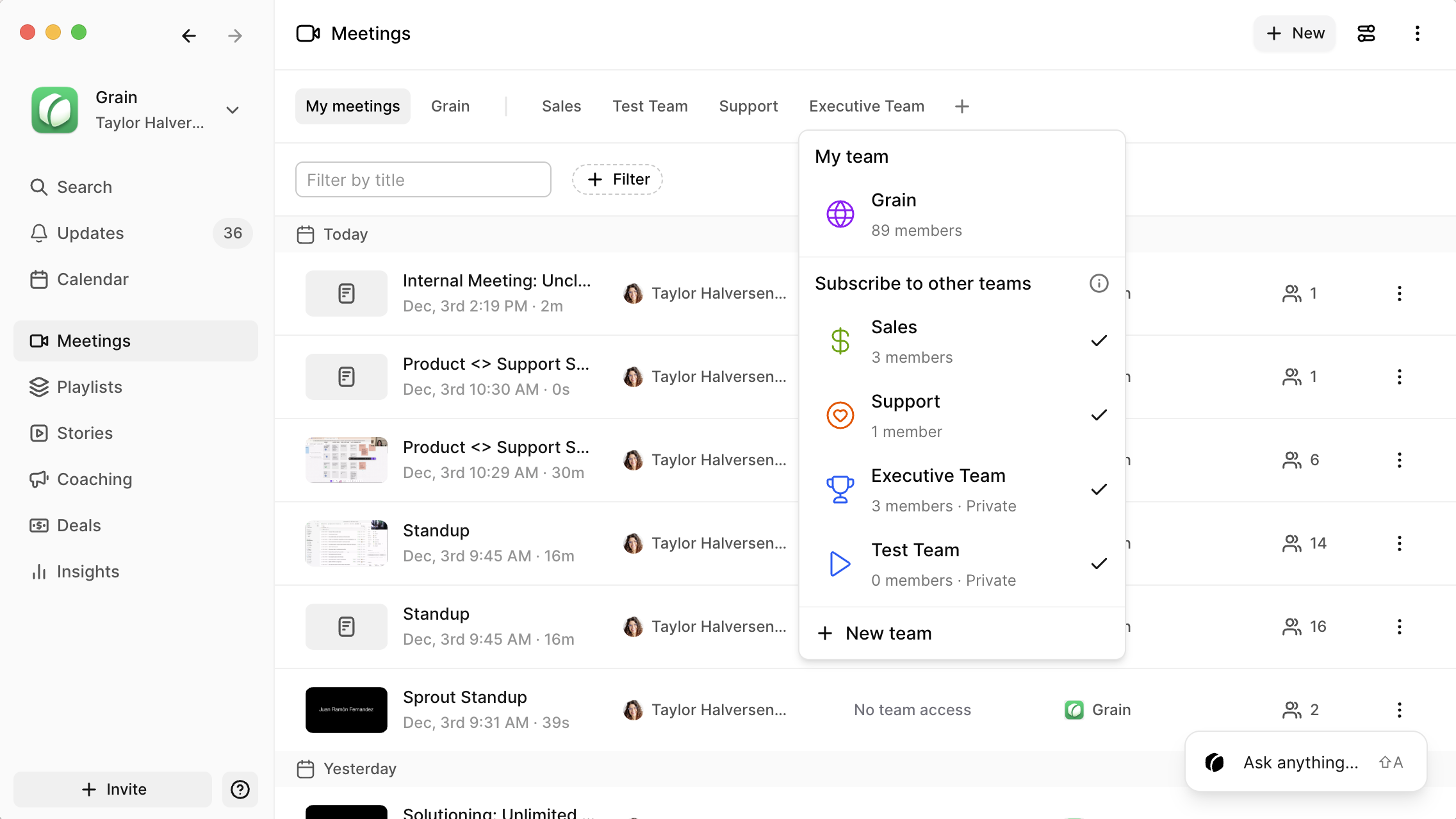
Teams improvements
In addition to the baseline teams functionality we announced last month, we've made some updates:
- Private team subscription: Admins can subscribe workspace members to private teams
- Multi-team sharing: Meetings are shared to participants' teams based on team rules. Users can also manually share meetings with teams via the share button.

Learn more about teams or set up some time to go through the functionality with our customer support team.
Workspace API for business plan
Our workspace API is now available for the business plan!
Build workflows that leverage your meeting. Dive right in with our API documentation.
Automatically share content to a team and control has who access to it. Make auto-record and auto-share rules for teams within your workspace and set team content to be public or private.
Learn more about teams or set up some time to go through the functionality with our customer support team.
Grain has released a new desktop app that supports desktop capture, giving you automated AI notes without bots! Take notes on Slack huddles, other platforms, and even in-person meetings. Learn more.
Download the new app here! 🎉 (Note: Desktop capture currently only works on Apple Silicon & Windows computers.)
We've also recently released HubSpot property mapping. Use data from your calls to automatically (or with review) send updates to HubSpot fields.
Check out how to enable the feature 👇
We’ve made some exciting updates to Grain! Here’s what’s new:
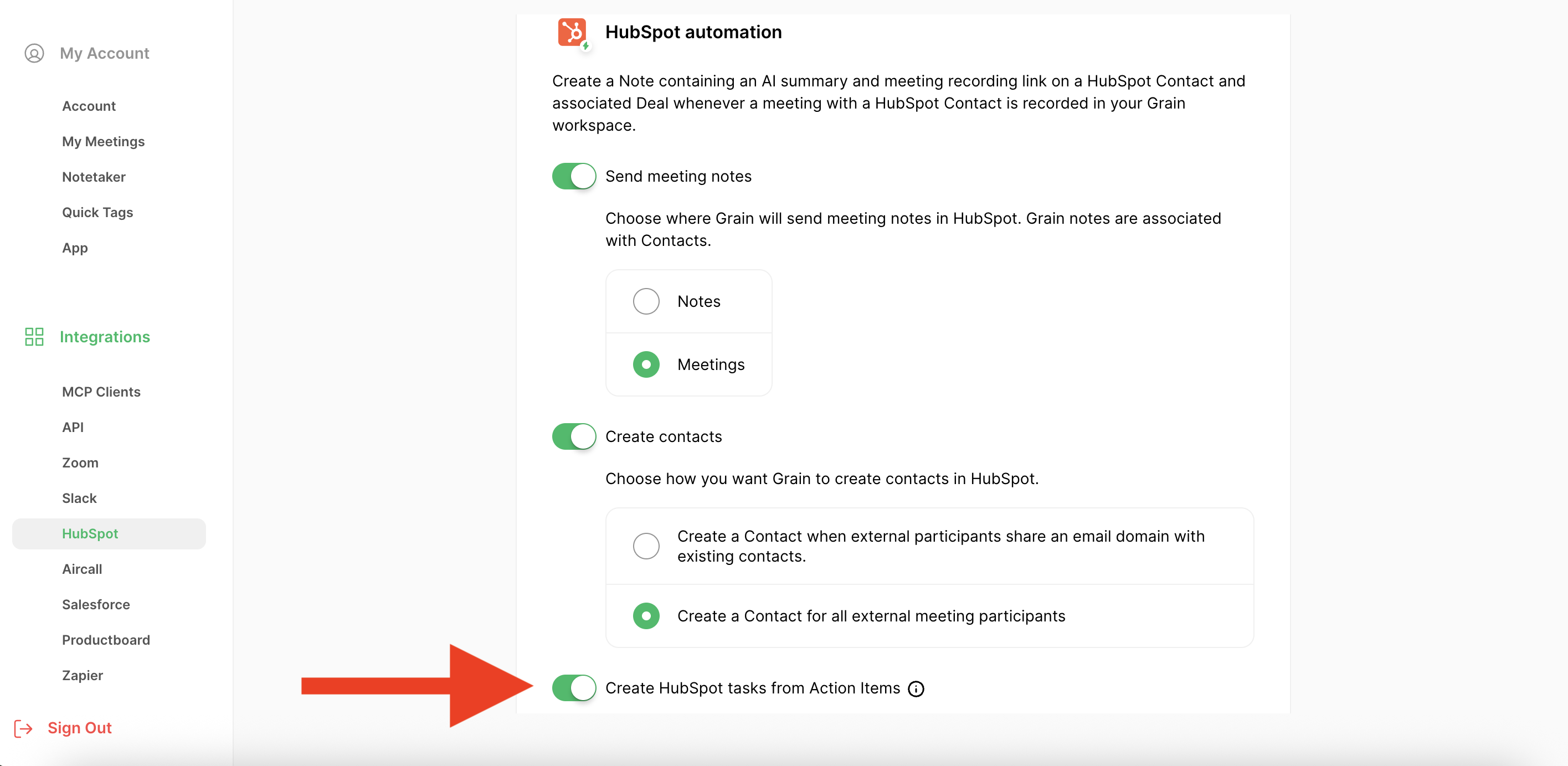
✅ Hubspot Tasks:
Action items from sales and customer calls connected to HubSpot will now appear under HubSpot "Tasks" in Deals.
🗑️ Auto-Deletion:
Admins can now set auto-deletion rules for their workspace's meetings. This setting includes the timeframe for deletion and whether to exclude internal meetings and playlists from deletion.
💬 MCP for ChatGPT:
Last month, we launched Grain's MCP, and it's now available for ChatGPT! 🎉
If you have a ChatGPT Pro plan, you can set it up by adding the Grain MCP as a connector in settings and selecting Grain as a source in your search. View the Quick Start Guide for more details.

📁 Meeting Type Filter:
We've introduced the ability to filter meetings based on meeting type. You can now narrow down your view to a specific type of meeting, streamlining your search.

Grain's official MCP server is available now for all users! 🎉
With Grain's new MCP server you can securely access your meetings, notes, transcripts, deals, & coaching scorecard data natively using Anthropic's new Claude Integrations (ChatGPT coming soon), or using mcp-remote in Cursor, Windsurf and other clients.
In addition to being able to ask any prompt in Cluade with Grain data, the server includes built-in MCP Prompts to run one-click reports like:
- 📣 Weekly "Voice of the Customer" reports to track sentiment & requests
- 📊 Pipeline IQ analysis to identify high opportunity & at-risk deals
- 🌶️ SPICED/MEDDICC reports to deeply understand a deal across meetings
- 🗣️ Sales Skill Scorecards to eval and track our team's performance over time
Check the demo and quick-start guide to get set up in less than 60 seconds.
Best,
Mike
60 Second Set-up Instructions
Native Integration Details:
- Integration Name: Grain
- Integration URL: https://api.grain.com/_/mcp
Mangual Config via mcp-remote:
{ "grain": { "command": "npx", "args": ["-y", "mcp-remote", "https://api.grain.com/_/mcp"] } }
April showers washed away some bugs and bloomed some new features. Here’s what’s new:
📚 Topics

Meeting summaries should make you feel like you were present—easy to read and filled with meaningful insights. With Topics, you can now navigate your meeting's key themes, organized by topic instead of the order in which they were discussed.
We've replaced chapters with topics in the summary tab - but don't worry! You can still review your meeting by chapters via the Chapters tab.
💌 Updated Follow-Up Emails

Follow-up emails just got more personal! We've improved the email signatures to always use your name when you send a follow-up email through Grain. Plus, we’ve turned follow-up emails on for internal meetings, so you can send next steps or follow up with team members in just a few clicks.
💬 New AI Feedback Options

You can now leave feedback directly on both the summary tab and Ask Grain output. Whether Grain hits the mark or falls short, your feedback is invaluable as our team builds Grain, so don’t hesitate to share your thoughts with us!
🎥 Video Player Minimization

You can now hide the video player via the chevron in the right side panel on your meeting page. Enjoy a cleaner view and more room to review clips, comments, or use Ask Grain!
🛠 General Improvements & Fixes
- Copy/Paste Story Text: Easily copy and paste story text from the story page for smoother workflows.
- Copy Ask Grain Output: Quickly copy the answers you get from Ask Grain with the new copy button in the top bar.
- Coaching Stability: We’ve improved coaching stability to ensure you always receive a coaching summary, and added the ability to collapse the video player to better view multiple scorecards.
- SPICED Deal Analysis: We've improved consistency with SPICED analysis and now include timestamps of the last update to SPICED fields in HubSpot.
As always, we’d love to hear what you think about these updates - especially your feedback on the new Topics organization! Hit reply with your feedback or any questions.
Cheers,
Jeff
March brought madness — and a bunch of updates we think you’ll really like. Here's what's new:
📣 Ask Grain: Ask Grain anything about your meeting, just like you might do with ChatGPT. You can generate a document using your meeting transcript, ask for deeper insight, and much more.

Grain will create suggestions of questions you may like to know the answers to. And, unlike ChatGPT, Grain will provide citations to the exact points within the meeting Grain is referencing.

We'd love to hear how you're using Ask Anything! Chat in with any questions or prompts you find useful.
📋 Copy transcript button: You asked, we listened! It's now easier than ever to copy a meeting transcript. Click the "Copy transcript" icon on the transcript tab of any meeting to copy the meeting transcript directly to your clipboard.

🎬 Create clips from action items: Now you can create a clip for each action item Grain identifies in your meetings via the "Create clip" button in the hover menu.

🤝 Simpler onboarding for your team: We've made it a lot easier to start with Grain. Check out our new onboarding video if you're new to Grain or need a quick refresher.
🪲 Squashed some bugs: We've identified and removed issues effecting searching by tags, desktop notifications, and follow-up emails, and fixed a few other minor bugs.
We always love to hear what you think about what's new - shoot us a message with feedback or questions!
We didn’t let the shortest month stop us — We’ve been working on some quality-of-life improvements to make Grain even more seamless and efficient. Here’s what’s new:
📧 Follow-up Email: We’ve added an auto-generated follow-up email button to the meeting page and meeting recap email. Find it in the "Send" drop-down on the meeting page or in your recap email by clicking "Draft AI Follow-up Email" in the top-right corner.

💻 Desktop Redirect: Grain now auto-detects if you have the desktop app installed and lets you choose whether to open links in the app or on the web.

🎥 Forward & Rewind: You can now jump ahead or back 10 seconds while watching a Story.

📂 Shift+Click for Bulk Actions: You can now Shift + Click to bulk select meetings in your Meeting Library, making organizing and sharing meetings much faster.

We’re always working behind the scenes to improve performance and keep Grain running smoothly.
Let us know what you think—shoot us a message with feedback or questions!
Try Grain today. It’s free forever.